Last Updated: July 16, 2026
When a SQL Server database slows down, most teams face the same two options: spend money on additional hardware or invest time in tuning. Hardware is fast to procure and easy to justify, but it rarely solves the underlying problem and delivers diminishing returns. Index optimization, by contrast, addresses the root cause directly. A single missing index can turn a millisecond query into a multi-second table scan. A single redundant index imposes write overhead on every INSERT, UPDATE, and DELETE against that table, indefinitely.
This guide explains how SQL Server indexes work, how to identify the specific index problems degrading your workload, and how AI SQL Tuner Studio automates the entire analysis — delivering prioritized, ready-to-implement recommendations in minutes rather than hours.
Why SQL Server Index Optimization Matters
An index in SQL Server is a separate on-disk structure that allows the query engine to locate rows without scanning an entire table. Without an appropriate index, SQL Server performs a full table scan — reading every row regardless of how many rows match the query. On a table with millions of rows, a scan that should return one row can consume seconds of CPU and thousands of I/O operations. With the right index, the same query executes as a seek: a lookup that finds the target rows in milliseconds.
Index problems fall into three categories, each with a different impact profile:
- Missing indexes cause table scans instead of seeks, driving up CPU and I/O under query load.
- Unused, redundant or bloated indexes add overhead to every write operation without providing any read benefit.
- Fragmented indexes reduce page density, forcing SQL Server to read more pages to return the same data.
All three problems compound over time as data volumes grow and query patterns evolve. Index optimization is not a one-time task; it is an ongoing operational requirement for any production SQL Server workload.
Types of SQL Server Indexes
Understanding which index type applies to a given problem is essential before making changes. Microsoft’s SQL Server Index Design Guide covers the full specification; the four types most relevant to optimization work are:
Clustered Index
A clustered index defines the physical storage order of rows in a table. SQL Server stores the actual data rows as the leaf level of the clustered index B-tree. Each table can have only one clustered index. Most tables should have a clustered index on their primary key; heap tables (no clustered index) are generally a performance liability because SQL Server cannot efficiently navigate to specific rows without one.
Nonclustered Index
A nonclustered index is a separate structure containing the indexed column values and a pointer (the row locator) back to the data row in the clustered index or heap. SQL Server supports up to 999 nonclustered indexes per table, though practical limits are much lower. Each nonclustered index adds storage and write overhead, so every index must justify its cost in read performance gained.
Columnstore Index
Columnstore indexes store data organized by column rather than by row, enabling batch-mode execution and high compression ratios. They deliver dramatic performance gains for analytics and reporting workloads — scan-heavy queries that aggregate large amounts of data across many rows. SQL Server supports both clustered and nonclustered columnstore indexes. For OLTP workloads with frequent single-row lookups, rowstore nonclustered indexes remain the better choice.
Covering Index
A covering index is a nonclustered index that includes all columns a specific query needs: key columns in the WHERE clause plus any additional columns in the SELECT list as INCLUDE columns. When a covering index exists, SQL Server satisfies the entire query from the index without a key lookup into the clustered index, eliminating an additional I/O operation per row.
How to Identify Index Problems in SQL Server
SQL Server exposes index telemetry through a set of dynamic management views (DMVs) and SSMS reports. The data is available at no additional cost and requires only read access to system tables. The challenge is knowing which signals to look at, how to interpret them together, and how to prioritize what to fix first.
Finding Missing Indexes
SQL Server’s query optimizer records index recommendations in memory each time it compiles a query plan and determines that a useful index is absent. These recommendations accumulate in the sys.dm_db_missing_index_details, sys.dm_db_missing_index_groups, and sys.dm_db_missing_index_group_stats DMVs. You can also view them in SSMS via Reports > Standard Reports > Performance Dashboard, then click the Missing Indexes link.
Two caveats apply. First, the recommendations are not deduplicated; SQL Server may log multiple overlapping suggestions for the same table. Before creating an index, check whether an existing index could be extended with a new INCLUDE column to satisfy the same need. Second, the optimizer’s recommendations are generated per-query and do not account for write overhead, so a naively implemented missing index can harm overall workload performance even while improving one specific query.
You can use the SQL statement below to find the 20 missing indexes for the current database with the highest overall impact:
SELECT TOP 20
    s.name + '.' + o.name AS TableName,
    d.equality_columns,
    d.inequality_columns,
    d.included_columns,
    stats.avg_total_user_cost,
    stats.avg_user_impact,
    stats.user_seeks + stats.user_scans AS TotalSeeksScans
FROM sys.dm_db_missing_index_details d
INNER JOIN sys.dm_db_missing_index_groups g ON d.index_handle = g.index_handle
INNER JOIN sys.dm_db_missing_index_group_stats stats ON g.index_group_handle = stats.group_handle
INNER JOIN sys.objects o ON d.object_id = o.object_id
INNER JOIN sys.schemas s ON o.schema_id = s.schema_id
WHERE d.database_id = DB_ID()
ORDER BY (stats.avg_total_user_cost * stats.avg_user_impact * (stats.user_seeks + stats.user_scans)) DESC;
To tune one specific slow query end to end use SQL query tuner. It will provide recommendations based on the query’s execution plan, which can include indexes as well as query rewrites. Modifying the query can often provide more improvements than index changes alone.
Finding Bloated, Unused, and Redundant Indexes
The sys.dm_db_index_usage_stats DMV records how many times each index has been accessed for seeks, scans, lookups, and updates since the last SQL Server restart. SSMS surfaces this data in the Index Usage Statistics report (Reports > Standard Reports > Index Usage Statistics).
An index with high user_updates and near-zero user_seeks and user_scans is consuming write overhead without providing any read benefit. These are strong candidates for removal — but verify first that the index is not relied upon for a constraint or a query that runs infrequently (such as a monthly report) and therefore shows low usage stats at the time of review.
Duplicate and redundant indexes — where one index’s key columns are a leading prefix of another — should also be consolidated. Maintaining two indexes that serve overlapping purposes doubles write overhead for no additional query benefit.
Include columns in an index can also help performance by satisfying the query directly from the index. However, unneeded columns add write overhead and use disk space, since you are effectively keeping an extra copy of the table’s data with the subset of columns in the include clause.
The statement below will show the index usage for the current database, along with each index’s size and type of compression:
SELECT
    sch.name + '.' + obj.name AS TableName,
    i.name AS IndexName,
    i.type_desc,
    STUFF((
        SELECT ',' + c.name
        FROM sys.index_columns ic2
        INNER JOIN sys.columns c ON ic2.object_id = c.object_id AND ic2.column_id = c.column_id
        WHERE ic2.object_id = i.object_id AND ic2.index_id = i.index_id AND ic2.is_included_column = 0
        ORDER BY ic2.key_ordinal
        FOR XML PATH(''), TYPE).value('.', 'nvarchar(max)'), 1, 1, '') AS KeyColumns,
    STUFF((
        SELECT ',' + c.name
        FROM sys.index_columns ic3
        INNER JOIN sys.columns c ON ic3.object_id = c.object_id AND ic3.column_id = c.column_id
        WHERE ic3.object_id = i.object_id AND ic3.index_id = i.index_id AND ic3.is_included_column = 1
        ORDER BY ic3.column_id
        FOR XML PATH(''), TYPE).value('.', 'nvarchar(max)'), 1, 1, '') AS IncludedColumns,
    ISNULL(s.user_seeks, 0) AS user_seeks,
    ISNULL(s.user_scans, 0) AS user_scans,
    ISNULL(s.user_lookups, 0) AS user_lookups,
    ISNULL(s.user_updates, 0) AS user_updates,
    ROUND((ps.page_count * 8) / 1024.0, 1) AS SizeMB,
    p.data_compression_desc AS Compression
FROM sys.indexes i
INNER JOIN sys.objects obj ON i.object_id = obj.object_id
INNER JOIN sys.schemas sch ON obj.schema_id = sch.schema_id
LEFT JOIN sys.dm_db_index_usage_stats s ON s.object_id = i.object_id AND s.index_id = i.index_id AND s.database_id = DB_ID()
LEFT JOIN (
    SELECT object_id, index_id, SUM(in_row_data_page_count + lob_used_page_count + row_overflow_used_page_count) AS page_count
    FROM sys.dm_db_partition_stats GROUP BY object_id, index_id
) ps ON ps.object_id = i.object_id AND ps.index_id = i.index_id
LEFT JOIN (
    SELECT object_id, index_id, MAX(data_compression_desc) AS data_compression_desc
    FROM sys.partitions GROUP BY object_id, index_id
) p ON p.object_id = i.object_id AND p.index_id = i.index_id
WHERE obj.type = 'U'
  AND EXISTS (SELECT 1 FROM sys.objects o WHERE o.object_id = obj.object_id)
ORDER BY ISNULL(s.user_seeks, 0) + ISNULL(s.user_scans, 0) + ISNULL(s.user_lookups, 0) DESC;
Eliminating redundant, unused, or bloated indexes is critical to maintaining overall performance for any SQL Server database that has significant write activity.
Detecting Index Fragmentation
Index fragmentation occurs when the logical order of pages in an index no longer matches their physical order on disk, or when pages are less than fully populated. Fragmented indexes require SQL Server to read more pages to return the same data, increasing I/O.
Query sys.dm_db_index_physical_stats and check avg_fragmentation_in_percent for each index:
- Below 10%: no action needed.
- 10–30%: use
ALTER INDEX ... REORGANIZE— an online, low-impact operation. - Above 30%: use
ALTER INDEX ... REBUILD— more thorough, but acquires a schema lock. UseONLINE = ONin Enterprise edition to minimize blocking.
You can use the code below to find the average page density and fragmentation for of each index for the 20 largest tables in the database that have more than 10,000 rows:
CREATE TABLE #DensityCandidates (object_id int NOT NULL);
CREATE TABLE #PageDensityResults (
    TableName      nvarchar(512),
    IndexName      sysname,
    IndexType      nvarchar(60),
    AvgPageDensityPct    float,
    AvgFragmentationPct  float,
    PageCount      bigint,
    RecordCount    bigint
);

-- Get object ids for 20 largest user tables
INSERT INTO #DensityCandidates (object_id)
SELECT TOP 20 ps.object_id
FROM sys.dm_db_partition_stats AS ps
INNER JOIN sys.objects o ON ps.object_id = o.object_id
WHERE ps.index_id IN (0, 1)
  AND o.type = 'U'
  AND ps.object_id NOT IN (SELECT object_id FROM #DensityCandidates)
GROUP BY ps.object_id
HAVING SUM(ps.row_count) > 10000
ORDER BY SUM(ps.row_count) DESC;

DECLARE @ObjId int;
DECLARE density_cur CURSOR LOCAL FAST_FORWARD FOR
    SELECT DISTINCT object_id FROM #DensityCandidates;

OPEN density_cur;
FETCH NEXT FROM density_cur INTO @ObjId;

WHILE @@FETCH_STATUS = 0
BEGIN
    IF EXISTS (SELECT 1 FROM sys.objects WHERE object_id = @ObjId)
    BEGIN
        INSERT INTO #PageDensityResults
        SELECT
            SCHEMA_NAME(o.schema_id) + '.' + o.name,
            i.name,
            i.type_desc,
            ips.avg_page_space_used_in_percent,
            ips.avg_fragmentation_in_percent,
            ips.page_count,
            ips.record_count
        FROM sys.dm_db_index_physical_stats(DB_ID(), @ObjId, NULL, NULL, 'SAMPLED') ips
        INNER JOIN sys.objects o  ON ips.object_id = o.object_id
        INNER JOIN sys.indexes i  ON ips.object_id = i.object_id AND ips.index_id = i.index_id
        WHERE o.type = 'U'
          AND ips.alloc_unit_type_desc = 'IN_ROW_DATA'
          AND ips.page_count > 128
          AND ips.avg_page_space_used_in_percent IS NOT NULL
          AND i.name IS NOT NULL;
    END

    FETCH NEXT FROM density_cur INTO @ObjId;
END

CLOSE density_cur;
DEALLOCATE density_cur;

SELECT
    TableName, IndexName, IndexType,
    AvgPageDensityPct, AvgFragmentationPct, PageCount, RecordCount
FROM #PageDensityResults
ORDER BY AvgPageDensityPct ASC;

DROP TABLE #PageDensityResults;
DROP TABLE #DensityCandidates;
Note that fragmentation thresholds matter more on mechanical disk environments. On NVMe or solid-state storage, the I/O cost of random page access is lower, so fragmentation has less impact than on spinning disks.
Index Compression and Fill Factor
Beyond index structure, two configuration settings have significant impact on storage and query performance: data compression and fill factor.
Row and Page Compression
SQL Server offers two levels of data compression for indexes and tables:
- Row compression stores fixed-length data types in variable-length format, eliminating unnecessary padding. For example, a
CHAR(50)column containing a 6-character value stores only 6 bytes rather than 50. Row compression reduces storage with minimal CPU overhead. - Page compression applies prefix and dictionary compression within each 8 KB page, identifying repeating byte patterns across rows and storing them once. Page compression achieves higher compression ratios than row compression but adds more CPU overhead during reads and writes.
Compression is most beneficial on large, read-heavy tables where I/O is the bottleneck. For write-intensive tables, measure CPU overhead before committing to page compression in production.
Fill Factor
Fill factor controls how much free space SQL Server reserves on each index page when the index is created or rebuilt. A fill factor of 80 leaves 20% of each page empty, providing room for future inserts and reducing page splits. A fill factor of 100 packs pages completely — efficient for read-only or rarely-updated data, but prone to fragmentation in write-heavy workloads.
SQL Server’s default fill factor is 0, which SQL Server treats as 100 for most workloads. For tables with frequent inserts into the middle of the index range (non-sequential keys), a fill factor of 70–85 is a common starting point. The right value depends on write frequency and how often you run index maintenance.
Hardware vs. Index Optimization: The Real Cost
When database performance degrades, hardware upgrades are tempting because they require no code changes and can be provisioned quickly. The cost, however, is substantial and recurring:
- Adding 2 processor cores to SQL Server Standard costs approximately $1,418 per year for the software license alone — before hardware, Windows Server licensing, or cloud infrastructure costs.
- The same 2-core add-on for SQL Server Enterprise runs approximately $5,434 per year.
Index tuning addresses the root cause: queries doing unnecessary work because they cannot find data efficiently. A well-targeted index can eliminate the need for a hardware upgrade entirely, and the fix is permanent rather than recurring. For teams managing cloud-hosted instances where compute costs scale directly with resource consumption, the savings compound with every database you optimize.
AI-Powered Index Tuning with AI SQL Tuner Studio
Manually working through missing index DMVs, index usage statistics, plan cache data, and fragmentation reports across multiple databases is time-consuming and requires synthesizing signals that interact with each other in non-obvious ways. AI SQL Tuner Studio automates the full analysis workflow and delivers results in minutes.
How AI SQL Tuner Studio Analyzes Indexes
AI SQL Tuner Studio connects to your SQL Server instance using a least-privilege account that reads system tables without making any changes. It gathers execution plan data, plan cache patterns, Query Store metrics, index usage statistics, missing index recommendations, and wait stats — then passes the combined signal set to an AI model for analysis. The AI cross-references all sources to produce a prioritized recommendation list that accounts for write overhead, existing index coverage, and workload patterns rather than treating each DMV in isolation.
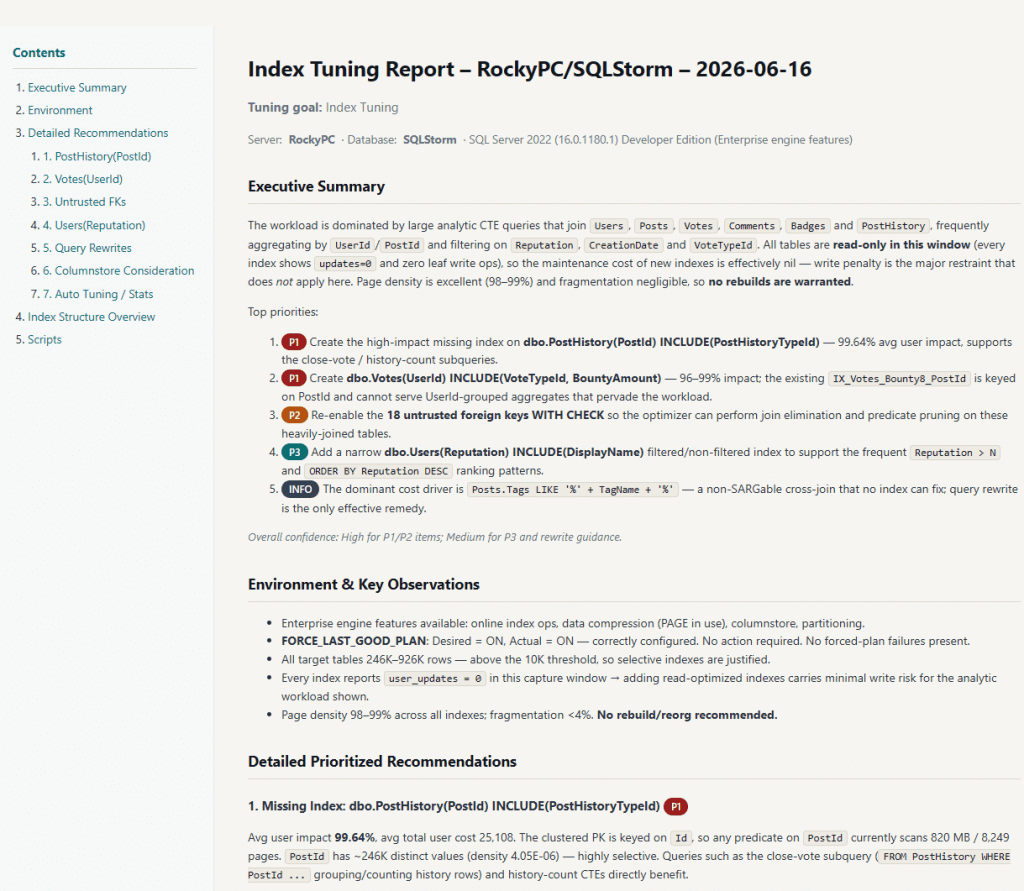
Every recommendation includes the exact T-SQL deployment script needed to implement the change, along with an explanation of why the change is recommended and what impact to expect. You can review the full output before running anything. See sample AI SQL Tuner Studio reports to understand the format and depth of analysis.
Supported AI Models
AI SQL Tuner Studio integrates with leading AI models so you can choose the one that best fits your requirements:
- All editions — OpenAI GPT-5.4 and Anthropic Claude Sonnet 4.6
- Corporate edition (in addition to the above) — Anthropic Claude Opus 4.6, 4.7, and 4.8, providing maximum reasoning depth for complex multi-database environments
If the primary model deployment hits a rate limit, AI SQL Tuner Studio automatically retries with a secondary deployment so your analysis completes without manual intervention.
Supported SQL Server Environments
AI SQL Tuner Studio supports index tuning across SQL Server Developer Edition (free, no time limit), SQL Server Standard and Enterprise editions, Azure SQL Database, Azure SQL Managed Instance, and Microsoft Fabric SQL Database.
The free edition works with SQL Server Developer Edition at no cost. Paid plans include a 14-day free trial and a 30-day money-back guarantee. Download the free edition or compare editions and pricing.
How AI SQL Tuner Studio Compares to Manual Tools
The traditional manual toolkit — SSMS reports, sp_BlitzIndex from Brent Ozar Unlimited, and the DMV queries shared earlier — provides the raw data but leaves interpretation entirely to the DBA. AI SQL Tuner Studio automates the interpretation step: it reads the same signals and produces an ordered action plan with implementation scripts. For a detailed comparison, see AI SQL Tuner Studio vs. Database Engine Tuning Advisor.
For a broader treatment of SQL Server performance tuning beyond indexes, see the SQL Server Performance Tuning Guide.
Frequently Asked Questions
How often should I rebuild SQL Server indexes?
Microsoft recommends rebuilding indexes when fragmentation exceeds 30% and reorganizing when fragmentation is between 10% and 30%. For most production workloads, a weekly maintenance window is sufficient. High-write tables may require more frequent attention. Always query sys.dm_db_index_physical_stats before scheduling rebuilds — rebuilding a non-fragmented index wastes CPU and generates unnecessary transaction log growth.
What is the difference between a missing index and an unused index in SQL Server?
A missing index is one that SQL Server’s query optimizer identified as potentially helpful when compiling a query plan, but which does not yet exist. An unused index exists in the database but has not been accessed for seeks or scans since the last SQL Server restart. Unused indexes still consume storage and impose write overhead on every INSERT, UPDATE, and DELETE — making them a net performance liability that should be dropped after careful review.
What is a covering index in SQL Server?
A covering index is a nonclustered index that includes all columns a specific query needs — both the key columns used in the WHERE clause and any additional columns returned by the SELECT statement, specified as INCLUDE columns. When a covering index exists, SQL Server satisfies the entire query from the index without performing a key lookup into the clustered index, significantly reducing I/O and improving query performance.
When should I use a columnstore index in SQL Server?
Columnstore indexes deliver the largest gains on analytics and reporting workloads — queries that aggregate or scan large numbers of rows across many columns. They are not well-suited to OLTP tables with frequent single-row lookups. SQL Server supports both clustered and nonclustered columnstore indexes. If your workload mixes OLTP and analytics patterns, a nonclustered columnstore index on a rowstore table can serve both without a schema redesign.
Can AI automate SQL Server index tuning?
AI SQL Tuner Studio automates the data-gathering and analysis steps that are most time-consuming for DBAs: scanning plan cache, reviewing index usage statistics, identifying fragmentation, and cross-referencing missing index DMVs. It delivers prioritized recommendations with ready-to-run T-SQL scripts. A DBA reviews and approves changes before deployment. AI accelerates the analysis cycle from hours to minutes but does not replace the judgment needed to evaluate business context and change risk.
Start Optimizing SQL Server Indexes Today
SQL Server index optimization is the highest-impact performance improvement available to most database teams. The data you need is already in SQL Server’s DMVs; the challenge is gathering it, interpreting the signals together, and prioritizing the changes with the biggest impact. AI SQL Tuner Studio handles that workflow automatically, using GPT-5.4 or Claude Sonnet 4.6 (or Claude Opus in the Corporate edition) to analyze your specific workload and deliver an ordered action plan with deployment scripts included.
Download the free edition for SQL Server Developer Edition at no cost, or explore paid plans for production SQL Server, Azure SQL Database, Azure SQL Managed Instance, and Fabric SQL Database — all covered by a 30-day money-back guarantee.
To learn more about AI SQL Tuner’s SQL Server index optimization feature, see Index Tuning Goal | AI SQL Tuner. You can also go to AI SQL Tuner Studio Sample Reports to see complete example reports or a screenshot of one below.