

By Kevin A. Feit
AI SQL Tuner Studio 1.0.40 is now available. This release introduces a redesigned interface, full light/dark mode support, a new Paper & Teal color palette, one-click Export SQL for recommendations, and an upgraded Help menu for DBAs and SQL Server developers.
Table of Contents
What’s new at a glance
| Feature | Description | Editions Affected |
|---|---|---|
| Revamped user interface | Six tuning goals are now tappable cards. More space for report with collapsible goals and console. Always-on status bar. | All |
| Enhanced color palette | Paper and teal replaces blue theme for improved readability. | All |
| Dark mode | Dark mode with a graphite base that is easy on the eyes. | All |
| Export SQL | Save the recommended SQL to a file with a unique name. | All |
| Help Menu enhancements | Access release notes in addition to the latest user guide from the Help menu. | All |
Redesigned user interface
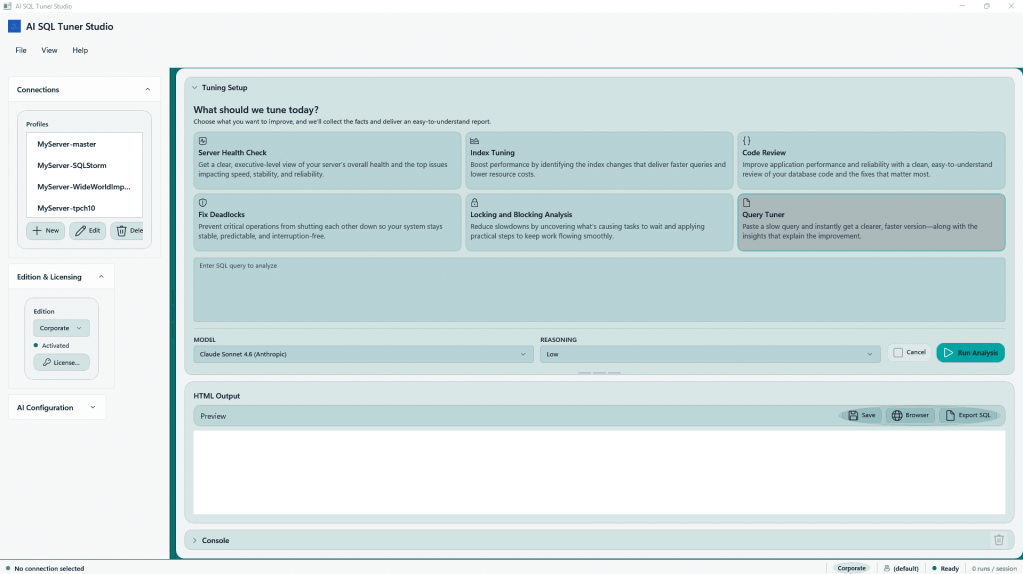
The screenshot above shows the new user interface. Choose a connection on the left, click on a goal on the right, provide additional information if needed for the goal (for the example the SQL statement if running query tuner), choose your model and reasoning effort and click the “Run Analysis”. The console is now a collapsible drawer at the bottom of the screen. There is also a status bar at the bottom to show key information, and the status of the analysis run.
The tuning goal is also a collapsible drawer, providing more room to review the HTML output. You can also click the Browser button to open in your browser if you prefer.
For a sample server health check report from Claude Sonnet 4.6 see Server Health Report – RockyPC – 2026-05-16. SQL Code Review – RockyPC / SQLStorm – 2026-05-16 is an example code review using Claude Opus 4.7, which requires Corporate Edition.
Enhanced color palette
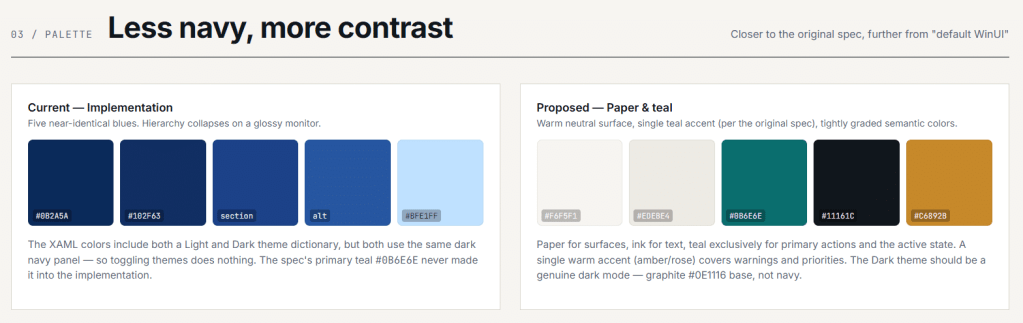
Based on feedback from my expert design reviewer, Claude Design, AI SQL Tuner Studio is now using a Paper & Teal theme instead of the blue focused theme that was previously in place. (What can I say, I barely passed my high school art class, and I guess we can see why.)
Anyway, I hope you like it better!
Dark Mode
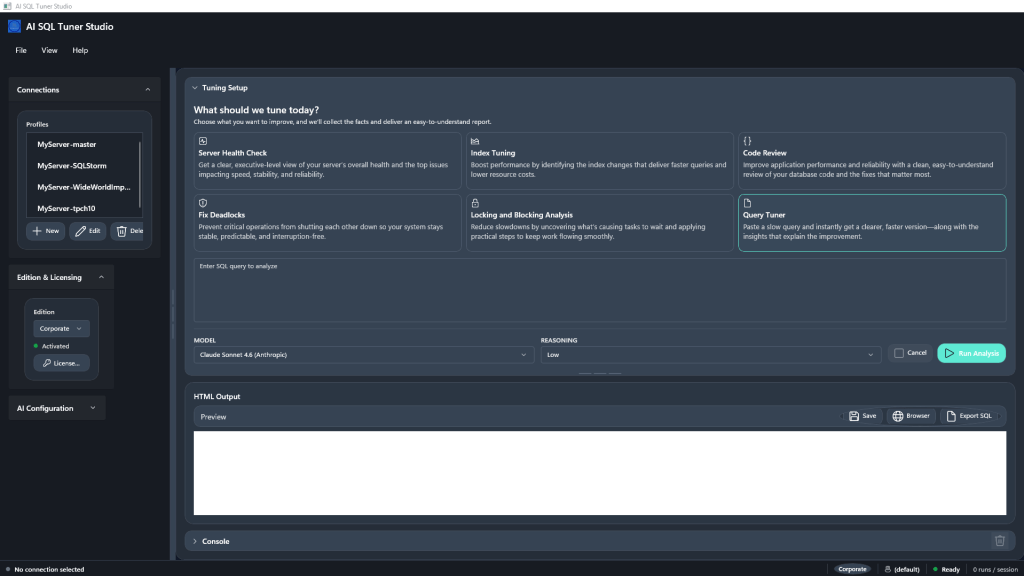
If you like Dark Mode, AI SQL Tuner Studio has got you covered. There is a new View menu, and with choices for Follow System, Light and Dark Modes.
Note: The HTML report also uses the new color scheme, but it currently uses light mode. Look for dark mode support for the HTML reports in a future release.
Export SQL
Once you have the HTML output, you can click the Export SQL button to extract the SQL in the recommendations to a file. This makes it easy to run the SQL in a lower environment, or have it ready to execute during a maintenance window.
The HTML save and Export SQL also now provide a default name that should make it easier to keep track of. It will be in the format tuning goal-report-model-servername-databasename-yyyy-mm-dd.html or .sql. You can always override the default name, of course.
Help menu enhancements
The Help-About menu now includes a link to the Release Notes. Help-Documentation shows the current User Guide, which has been updated to reflect the latest changes.
See SQL Server Locking and Blocking Analysis with AI SQL Tuner Studio 1.0.37 for a post about the previous release of AI SQL Tuner Studio.
Getting Started
If you are ready to get started, head over to Compare Editions to choose the version that is best for you. Use code PH30 to save 30% on Standard and Pro editions until May 31, 2026.