
Updated June 5, 2026
The SQL Code Review tuning goal in AI SQL Tuner Studio reviews up to 100 Transact-SQL stored procedures, functions, triggers, and views in a single pass — looking at your code base as a whole rather than one query at a time. It identifies performance issues, locking risks, anti-patterns, and best-practice violations, then returns a prioritized list of fixes with concrete T-SQL examples.
Table of Contents
Why a holistic, multi-object review changes the game
Most SQL code review tools — including IDE linters, GitHub Copilot reviews, and other AI-assisted tuners — look at one SQL statement at a time. You paste in a query, get feedback, paste in the next query, repeat. That works for a single ad-hoc lookup, but it misses the patterns that only emerge when you can see the whole module at once: shared bad joins across procedures, repeated non-SARGable filters, the same scalar UDF being called from twelve different places.
The Code Review tuning goal takes the opposite approach. In one run it pulls up to 100 object definitions from your database — stored procedures, functions, triggers, and views — along with table sizes and index usage statistics, then sends the entire bundle to a reasoning model for analysis. You get a single prioritized report ranked by impact, not 100 disconnected paragraphs.
What this means in practice:
- Faster — one click reviews an entire schema or release branch, not 100 individual paste-and-wait cycles.
- Holistic — the AI spots cross-object patterns: the same anti-pattern duplicated across procedures, indexes that one query needs and another already covers, locking hotspots that only become obvious when you see who else touches the table.
- Targeted when you need it — narrow the review to a specific schema, a single object by name, only the newest changes, or only the oldest legacy code that hasn’t been touched in years.
You can keep using single-statement reviewers for hot fixes. The Code Review tuning goal is what you reach for when you want to know how the whole module is doing.
What SQL Code Review Analyzes
Stored Procedures, Functions, Triggers, and Views
Object definitions are collected from the target database via sys.sql_modules. The following object types are included: stored procedures (P), scalar functions (FN), inline table-valued functions (IF), multi-statement table-valued functions (TF), triggers (TR), and views (V). Each object type has its own checkbox so you can include all four categories or narrow the review to just one.
Common Performance Issues
- Non-SARGable predicates (functions on columns, implicit conversions)
SELECT *usage- Missing indexes implied by query patterns
- RBAR patterns (row-by-row processing)
- Scalar UDF performance issues (version-dependent)
What does “SARGable” mean? SARGable stands for Search ARGument Able. A predicate is SARGable when SQL Server can use an index efficiently (typically an index seek) because the predicate compares a column directly to a constant or parameter — for example: WHERE CreatedDate >= @FromDate. Predicates are often non-SARGable when they apply expressions to the column side — for example: WHERE CONVERT(date, CreatedDate) = @Date or WHERE YEAR(CreatedDate) = 2025 — which can force scans and reduce plan quality.
What does “RBAR” mean? RBAR stands for Row-By-Agonizing-Row. It describes T-SQL patterns that process one row at a time — often via cursors, loops, or per-row function calls — instead of using set-based operations. RBAR can be dramatically slower at scale because it prevents SQL Server from optimizing the work as a set and can increase CPU, logging, and locking. Common examples include using a CURSOR to iterate rows, WHILE loops that select or update one row per iteration, or repeatedly calling a scalar UDF for each row in a large result set.
Concurrency and Locking Risks
- Long-running transactions
- Unnecessary locking hints
- Potential lock escalation patterns
- Hotspot tables
Safer Patterns and Maintainability
- Parameterization guidance
- Error handling patterns
- Consistent naming and schema qualification
Supplementary Context
In addition to object definitions, CodeReview collects:
- Top 100 tables by row count (tables over 1,000 rows) — helps the AI assess scale when reviewing code patterns.
- Top 50 indexes by size — includes key columns, included columns, usage stats (seeks, scans, lookups, updates), and size in MB. This drives index-aware code recommendations rather than generic advice.
Configure the review scope
Five scope controls let you point the review at exactly the code you want to evaluate:
- Object types — checkboxes for stored procedures, functions (UDFs), triggers, and views. At least one must be selected; all four are selected by default.
- Schema (optional) — restrict the review to objects in a specific schema (e.g.
Sales,dbo,Audit). Leave blank to review every schema. - Object name (optional) — restrict the review to objects whose name matches a specific value. Useful when you want a deep look at one procedure plus its supporting objects.
- Order — choose Newest (default) or Oldest. Newest reviews the most recently modified objects first — the natural choice after a release. Oldest reviews legacy code that hasn’t been touched in a long time — the natural choice when you’re auditing technical debt.
- Objects — number of objects to review, 1 to 100, default 100. Reduce if reasoning effort is High and the report is too large.
Each object definition is truncated to 4,000 characters so the entire bundle fits inside the AI model’s token window.
Common scope recipes:
- Post-release review of the last sprint: Object types = all, Schema = blank, Object name = blank, Order = Newest, Objects = 50.
- Audit a single problem procedure: Object types = Stored procedures, Schema =
Sales, Object name =usp_GetOrderHistory, Order = Newest, Objects = 1. - Legacy code sweep: Object types = all, Schema = blank, Object name = blank, Order = Oldest, Objects = 100.
- All views in the reporting schema: Object types = Views, Schema =
Reporting, Object name = blank, Order = Newest, Objects = 100.
Usage in AI SQL Tuner Studio
- Launch AI SQL Tuner Studio and select a connection to your SQL Server instance. The connection must specify a user database — Code Review cannot run against
master,tempdb,model, ormsdb. - In the Tuning section, select Code Review from the goal dropdown.
- Configure the scope:
- Object types — check the categories you want to include.
- Schema (optional) — narrow to one schema, or leave blank.
- Object name (optional) — narrow to one object, or leave blank.
- Order — Newest (default) or Oldest.
- Objects — 1 to 100, default 100.
- Set the Reasoning effort level (Low, Medium, or High) to control analysis depth.
- Click Run.
Progress and data collection status are shown in the Console panel. When complete, the HTML report appears in the Report panel.
What you get
The AI produces a prioritized set of recommendations, typically including:
High-impact query rewrites
- Make predicates SARGable
- Improve joins
- Reduce unnecessary work
Index recommendations (code-driven)
- Suggested indexes for specific query patterns observed across multiple objects
- Index maintenance considerations
Concurrency improvements
- Shorter transactions
- Reduce lock footprint
- Avoid problematic hints
Best-practice improvements
- Schema qualification
- Avoid ambiguous conversions
- Error handling guidance
Visual aids
Reports will include visual aids when they help communicate issues or recommendations. For example, the image below illustrates a contention concern in a code review of the Wideworldimporters sample database.
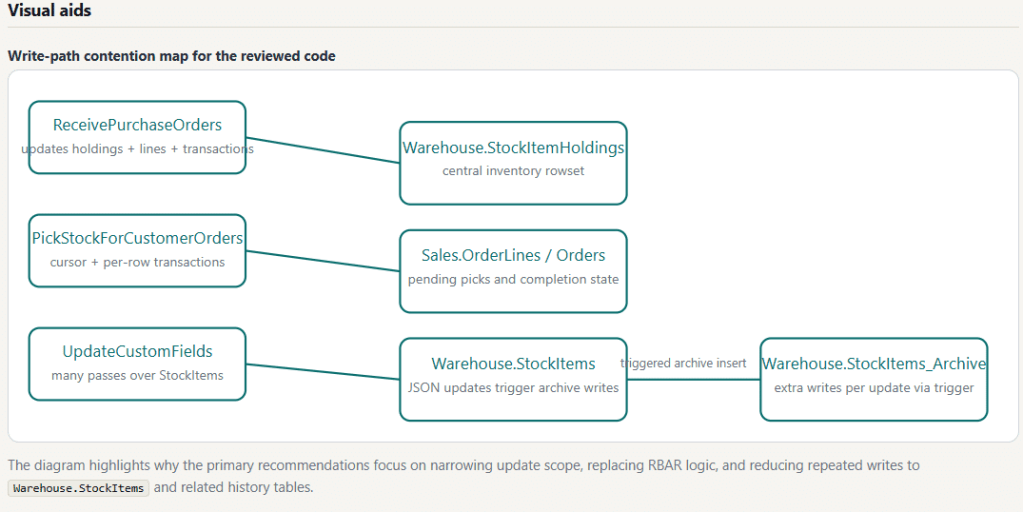
Warehouse.StockItems and related history tables.Because the review covers up to 100 objects in one pass, recommendations are often grouped: “this anti-pattern appears in 7 procedures, here is the fix template,” rather than the same advice repeated 7 times.
Platform Notes
- On-premises SQL Server: Supported.
- Azure SQL Database: Supported.
- Azure SQL Managed Instance: Supported.
- Microsoft Fabric SQL Database: Supported (treated similarly to Azure SQL Database).
Permissions Required
Minimum permissions needed on the target database:
VIEW DEFINITION— required to read object definitions fromsys.sql_modules,sys.objects,sys.schemas,sys.indexes,sys.index_columns,sys.columnsVIEW DATABASE STATE— required to readsys.dm_db_index_usage_stats,sys.dm_db_partition_stats,sys.tables,sys.partitions
Grant both with:
USE [YourDatabase];GRANT VIEW DEFINITION TO [YourLogin];GRANT VIEW DATABASE STATE TO [YourLogin];
No write permissions are required. Code Review is read-only.
Output Format
The HTML report includes:
- Executive summary with top priorities
- Detailed, prioritized recommendations with T-SQL code examples
- Cross-object pattern callouts (“this anti-pattern appears in N objects”)
- Table of contents for navigation
- Server name, version, and database information
- Footer showing the AI model and reasoning effort used
If the AI response is truncated due to output token limits, a warning banner appears in the report and the console shows a truncation warning. To resolve, lower the reasoning effort level or reduce the number of objects.
See AI SQL Tuner Studio Sample Reports for example code review reports.
Troubleshooting
Code Review Goal Is Disabled or Shows a Database Validation Error
Ensure your connection specifies a user database (not master, tempdb, model, or msdb). Edit the connection in the Connections section and set a valid user database.
“Access Denied” or Object Definition Unavailable
Ensure the login has VIEW DEFINITION and VIEW DATABASE STATE permissions on the target database.
Report Is Incomplete or Truncated
The console will show a truncation warning if the AI response was cut short. Lower the Reasoning effort level or reduce the number of Objects in the Code Review scope.
Schema or Object name filter returns nothing
Both filters do exact matching against sys.objects. Confirm the value is spelled correctly and the schema/object exists in the connected database. The Console panel logs the filter values used so you can verify.
Related Resources
- Query processing architecture guide — Microsoft Learn
- SQL Server Performance — Microsoft Learn
- AI SQL Tuner Studio User Guide
Frequently Asked Questions
How is this different from other AI code review tools?
Most SQL code review tools — including IDE linters, GitHub Copilot reviews, and other AI tuners — analyze one SQL statement at a time. You paste a query, get feedback, repeat. The Code Review tuning goal pulls up to 100 object definitions in one pass, plus table and index metadata, and analyzes them together. That single-pass approach surfaces cross-object patterns (the same anti-pattern repeated across procedures, indexes one query needs that another already covers) that single-statement tools cannot see, and it replaces 100 paste-and-wait cycles with one click.
How many objects does Code Review analyze by default?
By default, Code Review analyzes the top 100 most recently modified objects across all selected object types (stored procedures, functions, triggers, views). You can change this to any value between 1 and 100 in the Objects field, switch between newest-first or oldest-first ordering using the Order dropdown, and narrow further with the Schema and Object name filters. Each object definition is truncated to 4,000 characters to stay within AI token limits.
Can I review only one schema or one specific object?
Yes. The Schema field restricts the review to objects in a single schema (e.g. Sales, Audit). The Object name field restricts the review to a single named object. Both filters are optional — leave them blank to review across the whole database.
Can I review my legacy code separately from recent changes?
Yes. Set the Order dropdown to Oldest to review the objects with the earliest modify_date first. This is the cleanest way to audit technical debt — code that hasn’t been touched in years often hides anti-patterns that wouldn’t ship today.
What databases does the Code Review goal support?
The Code Review goal supports on-premises SQL Server, Azure SQL Database, Azure SQL Managed Instance, and Microsoft Fabric SQL Database. It cannot run against system databases (master, tempdb, model, msdb) — a user database must be specified in the connection.
What is a non-SARGable predicate and why does it matter?
A non-SARGable predicate is a WHERE clause condition that prevents SQL Server from using an index seek, typically because an expression or function is applied to the column rather than the value. For example, WHERE CONVERT(date, CreatedDate) = @Date is non-SARGable; WHERE CreatedDate >= @Date is SARGable. Non-SARGable predicates often force full table or index scans, which can severely hurt performance on large tables.
What is RBAR and why should I avoid it?
RBAR (Row-By-Agonizing-Row) refers to T-SQL patterns that process one row at a time instead of operating on sets. Common examples are CURSOR loops and WHILE loops that update or select individual rows. RBAR patterns are dramatically slower at scale and increase CPU, locking, and transaction log overhead. Code Review detects these patterns across every object in the review and suggests equivalent set-based rewrites.
What permissions does my SQL Server login need?
The login needs VIEW DEFINITION (to read object definitions) and VIEW DATABASE STATE (to read index usage and partition statistics) on the target database. No write permissions are required — Code Review is read-only. See the Permissions required section above for the exact GRANT statements.
Why is my Code Review report incomplete or truncated?
Truncation happens when the AI’s response exceeds the output token limit. This is more likely when reviewing many large objects at a high reasoning effort level. To resolve: lower the Reasoning effort to Low or Medium, reduce the Objects count, narrow the Object types selection, or use the Schema / Object name filters to focus the review. The console will show a truncation warning when this occurs.