

Updated November 5, 2026
The SQL Code Review tuning goal in AI SQL Tuner Studio reviews up to 100 Transact-SQL stored procedures, functions, triggers, and views in a single pass, looking at your code base as a whole rather than one query at a time. Set the order to Most expensive and it starts with the code that costs your server the most CPU, ranked from Query Store or the plan cache. It identifies performance issues, locking risks, anti-patterns, and best-practice violations, then returns a prioritized list of fixes with complete, ready-to-run T-SQL scripts.
Table of Contents
Why a holistic, multi-object review changes the game
Most SQL code review tools, including IDE linters, GitHub Copilot reviews, and other AI-assisted tuners, look at one SQL statement at a time. You paste in a query, get feedback, paste in the next query, repeat. That works for a single ad-hoc lookup, but it misses the patterns that only emerge when you can see the whole module at once: shared bad joins across procedures, repeated non-SARGable filters, the same scalar UDF being called from twelve different places.
The Code Review tuning goal takes the opposite approach. In one run it pulls up to 100 object definitions from your database (stored procedures, functions, triggers, and views) along with each object’s recorded workload, the types and collation of the columns the code uses, table sizes, and index usage statistics, then sends the entire bundle to a reasoning model for analysis. You get a single prioritized report ranked by impact, not 100 disconnected paragraphs.
What this means in practice:
- Faster: one click reviews an entire schema or release, not 100 individual paste-and-wait cycles.
- Holistic: the AI spots cross-object patterns: the same anti-pattern duplicated across procedures, indexes that one query needs and another already covers, locking hotspots that only become obvious when you see who else touches the table.
- Focused on cost: the Most expensive order reviews the code that uses the most CPU first, so the review goes where the payoff is.
- Targeted when you need it: narrow the review to a specific schema, a single object by name, only the newest changes, or only the oldest legacy code that hasn’t been touched in years.
You can keep using single-statement reviewers for hot fixes. The Code Review tuning goal is what you reach for when you want to know how the whole module is doing.
Review the most expensive code first
Sorting by modification date reviews what was deployed last, which is rarely what costs your server the most. The code that burns the most CPU is often old, stable, and never looked at again. The Most expensive order picks the objects with the most CPU recorded against them, so both the review and the space in the AI’s input go to the code that matters.
How Most expensive ranks your code
- Query Store, when it is on (
READ_WRITEorREAD_ONLY): total CPU over the last 30 days, summed over every statement Query Store records under the module. - Plan cache, when Query Store is off or recorded nothing for the selected objects:
sys.dm_exec_procedure_stats,sys.dm_exec_trigger_stats, andsys.dm_exec_function_stats. These hold statistics only since each plan was cached. - Modification date, when neither source can rank. The report says why.
Objects with recorded workload come first, by total CPU. Views, inline table-valued functions, and inlined scalar functions run inside the queries that reference them, so they have no workload of their own; they are ranked next by the CPU of the modules that reference them. Every reviewed object carries a workload line with its rank, CPU and share of the total, duration, logical reads, calls, and last execution, so the review can say why each finding matters.
Example: 92% of the CPU in five old objects
In the demo database from the video, a SQL Server 2025 store database with 35 procedures and functions, the ten newest objects used about 1% of the CPU that Query Store recorded. Five old objects used 92%: a phone lookup with an nvarchar parameter against a varchar column, an email lookup with UPPER() on an indexed column, a daily sales report with DATEDIFF on the order date, and a loyalty refresh whose cursor calls a scalar function for every customer.
With Order = Most expensive and Objects = 10, the review took about a minute with GPT-5.6 Luna at medium reasoning. Because Studio sends each column’s data type and the database collation, it confirmed the implicit conversion and the redundant UPPER() instead of hedging on them, and returned complete CREATE OR ALTER scripts for all four procedures plus a better index for the order history. We ran the scripts on a fresh copy of the database and replayed the same workload. Every result matched:
| Measured on SQL Server 2025 | Before | After the scripts |
|---|---|---|
| Phone lookup, per call | 7.7 ms | 0.15 ms |
| Order history by email, per call | 10.0 ms | 0.07 ms |
| Daily sales report, per call | 178 ms | 15 ms |
| Loyalty tier refresh, per region | 4.1 s | 0.45 s |
| CPU of the rewritten code | 35.8 s | 1.3 s |
| Whole workload, elapsed | 45.9 s | 16.2 s |
What SQL Code Review Analyzes
Stored Procedures, Functions, Triggers, and Views
Object definitions are collected from the target database via sys.sql_modules. The following object types are included: stored procedures (P), scalar functions (FN), inline table-valued functions (IF), multi-statement table-valued functions (TF), triggers (TR), and views (V). Each category has its own checkbox so you can include all four or narrow the review to just one.
- Stored procedures hold most of the business logic, so they are usually where the biggest wins are.
- Scalar functions are often called once per row, a common hidden source of RBAR.
- Table-valued functions: multi-statement ones in particular can cause poor cardinality estimates.
- Triggers are hidden execution paths that can add work and blocking to every write.
- Views: nested views and non-SARGable predicates in their definitions compound into the queries that use them.
Each definition is sent with its line breaks and every line numbered, so the report can point to exact lines and give a complete replacement that runs as-is. Definitions are sent whole up to 60,000 characters each and 300,000 in total, filled in the selection order. A longer definition is marked TRUNCATED and the report names the lines its changes replace; an object past the total is listed as NOT INCLUDED, and an encrypted or unreadable one as NOT AVAILABLE.
Common Performance Issues
- Non-SARGable predicates (functions on columns, implicit conversions)
SELECT *usage- Missing indexes implied by query patterns
- RBAR patterns (row-by-row processing)
- Scalar UDF performance issues (version-dependent)
What does “SARGable” mean? SARGable stands for Search ARGument Able. A predicate is SARGable when SQL Server can use an index efficiently (typically an index seek) because the predicate compares a column directly to a constant or parameter, for example: WHERE CreatedDate >= @FromDate. Predicates are often non-SARGable when they apply expressions to the column side, for example: WHERE CONVERT(date, CreatedDate) = @Date or WHERE YEAR(CreatedDate) = 2025, which can force scans and reduce plan quality.
What does “RBAR” mean? RBAR stands for Row-By-Agonizing-Row. It describes T-SQL patterns that process one row at a time, often via cursors, loops, or per-row function calls, instead of using set-based operations. RBAR can be dramatically slower at scale because it prevents SQL Server from optimizing the work as a set and can increase CPU, logging, and locking. Common examples include using a CURSOR to iterate rows, WHILE loops that select or update one row per iteration, or repeatedly calling a scalar UDF for each row in a large result set.
Concurrency and Locking Risks
- Long-running transactions
- Unnecessary locking hints (for example
UPDLOCKorTABLOCKX) - Potential lock escalation patterns
- Hotspot tables
Safer Patterns and Maintainability
- Parameterization guidance
- Error handling patterns (missing or inconsistent
TRY...CATCH) - Consistent naming and schema qualification
Supplementary Context
In addition to object definitions, Code Review collects:
- Workload per object: from Query Store over the last 30 days (or the plan cache), each object’s CPU, duration, logical reads, calls, and last execution. Objects with nothing recorded are flagged as potentially unused.
- Column types and collation: the database’s default collation, and the type, length, nullability, and index keys of each column the code names in the tables and views it references. This lets the review confirm that an
nvarcharparameter against avarcharcolumn converts the column, or thatUPPER()is redundant under a case-insensitive collation, instead of only suspecting it. - Top 100 tables by row count (tables over 1,000 rows): helps the AI assess scale when reviewing code patterns.
- Top 50 indexes by size: key columns, included columns, usage stats (seeks, scans, lookups, updates), and size in MB. This drives index-aware code recommendations and lets the report estimate the storage each index change costs or reclaims.
- Database settings that change the advice: when the code calls for them, the
sp_executesqlcompilation settings, CE and DOP feedback for objects with query hints, and optional parameter plan optimization for catch-all(@p IS NULL OR ...)predicates.
Configure the review scope
Five scope controls let you point the review at exactly the code you want to evaluate:
- Order: Newest (default) reviews the most recently modified objects first, the natural choice after a release. Oldest reviews legacy code that hasn’t been touched in a long time, the natural choice when you’re auditing technical debt. Most expensive reviews the objects with the most CPU recorded in Query Store or the plan cache, the natural choice when the server is busy and you want the biggest wins.
- Objects: number of objects to review, 1 to 100, default 100. With Most expensive, 10 to 25 usually covers most of the CPU.
- Object types: checkboxes for stored procedures, functions (UDFs), triggers, and views. At least one must be selected; all four are selected by default.
- Schema (optional): restrict the review to objects in a specific schema (e.g.
Sales,dbo,Audit). Leave blank to review every schema. - Object (optional): restrict the review to the object with this name. Useful when you want a deep look at one procedure. Schema is required when filtering by object name.
Common scope recipes:
- Find the code that costs the most: Order = Most expensive, Objects = 10 to 25, Object types = all, Schema and Object blank.
- Post-release review of the last sprint: Order = Newest, Objects = 50, Object types = all, Schema and Object blank.
- Audit a single problem procedure: Object types = Stored procedures, Schema =
Sales, Object =usp_GetOrderHistory, Objects = 1. - Legacy code sweep: Order = Oldest, Objects = 100, Object types = all, Schema and Object blank.
- All views in the reporting schema: Object types = Views, Schema =
Reporting, Object blank, Objects = 100.
Usage in AI SQL Tuner Studio
- Launch AI SQL Tuner Studio and select a connection profile. The connection must specify a user database; Code Review cannot run against
master,tempdb,model, ormsdb. - Under What should we tune today?, select the Code Review tile.
- In the Code review scope row, set the Order, the number of Objects, the object types, and, if you want, a Schema or Object filter.
- Choose the model and set the Reasoning level (Low, Medium, or High) to control analysis depth.
- Click Run Analysis. The Review run plan dialog lists every collector and the DMVs it reads before anything is sent; click Send to AI to continue.
Progress and data collection status are shown in the Console panel. When complete, the HTML report appears in the HTML Output preview, where you can save it, open it in a browser, or export its SQL scripts.
What you get
The AI produces a prioritized set of recommendations tied to the lines of code they change, with complete CREATE OR ALTER scripts for every object it rewrites. Typical recommendations include:
High-impact query rewrites
- Make predicates SARGable
- Match parameter types to the columns they compare
- Replace cursors and per-row function calls with set-based statements
- Improve joins and reduce unnecessary work
Index recommendations (code-driven)
- Suggested indexes for specific query patterns observed across multiple objects
- The estimated size of each index added or dropped, and the net storage change
- Index maintenance considerations
Concurrency improvements
- Shorter transactions
- Reduce lock footprint
- Avoid problematic hints
Best-practice improvements
- Schema qualification
- Avoid ambiguous conversions
- Error handling guidance
Visual aids
Reports include visual aids when they help communicate issues or recommendations. For example, the image below illustrates a contention concern in a code review of the WideWorldImporters sample database.
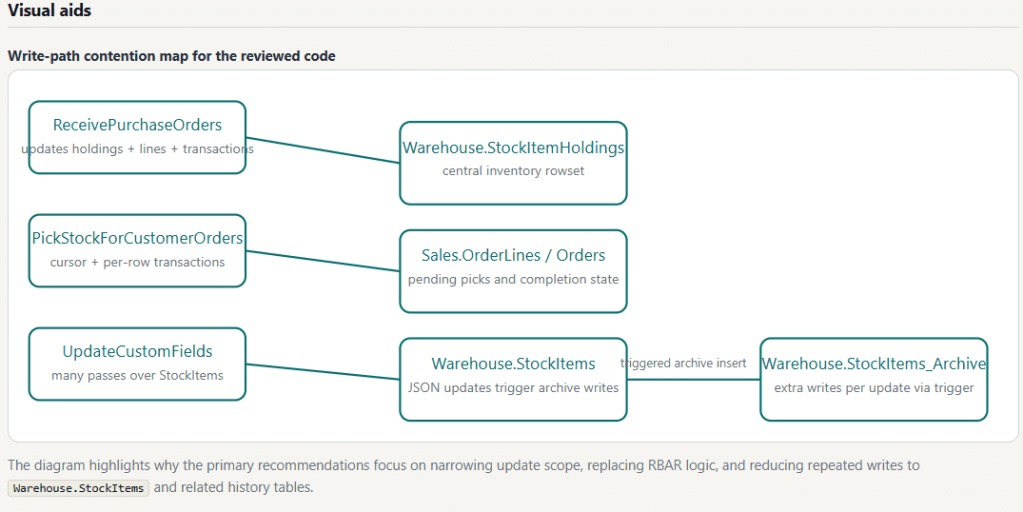
Warehouse.StockItems and related history tables.Because the review covers up to 100 objects in one pass, recommendations are often grouped: “this anti-pattern appears in 7 procedures, here is the fix template,” rather than the same advice repeated 7 times.
Platform Notes
- On-premises SQL Server: Supported.
- Azure SQL Database: Supported.
- Azure SQL Managed Instance: Supported.
- Microsoft Fabric SQL Database: Supported (treated similarly to Azure SQL Database).
- Amazon RDS for SQL Server (Standard, Enterprise, and Developer editions): Supported.
SQL Server 2016 and later is supported, including SQL Server 2019, 2022, and 2025. Every edition of AI SQL Tuner Studio, including Free, supports every platform.
Query Store workload is used when Query Store is enabled and readable (SQL Server 2016 and later, and on by default in Azure SQL Database). Where it isn’t, Code Review still completes: Most expensive ranks from the plan cache, and the workload lines say Query Store is unavailable.
Permissions Required
Minimum permissions needed on the target database:
VIEW DEFINITION: required to read object definitions fromsys.sql_modules,sys.objects,sys.schemas,sys.indexes,sys.index_columns,sys.columnsVIEW DATABASE STATE: required to read Query Store,sys.dm_db_index_usage_stats,sys.dm_db_partition_stats,sys.tables,sys.partitions
Grant both with:
USE [YourDatabase];GRANT VIEW DEFINITION TO [YourLogin];GRANT VIEW DATABASE STATE TO [YourLogin];
Optional, for the Most expensive order:
- The plan-cache fallback needs
VIEW SERVER STATE(VIEW SERVER PERFORMANCE STATEon SQL Server 2022 and later). - Ranking views and inline functions by their callers, and finding the tables each object references for the column metadata, read
sys.sql_expression_dependencies, which onlydb_ownercan read by default. Without it, those objects are listed with the rest, newest first, and referenced tables are found by name in the code.
No write permissions are required. Code Review is read-only. See Least Privileged Account Creation for AI SQL Tuner Studio for complete scripts.
Output Format
The HTML report includes:
- Executive summary with top priorities
- Scope and environment, including the database collation and any objects not reviewed
- Workload summary: each reviewed object’s CPU and share, logical reads, and calls
- Detailed, prioritized recommendations with the evidence and line numbers behind each one
- Cross-object pattern callouts (“this anti-pattern appears in N objects”)
- Index and storage impact of any index changes
- Scripts: complete
CREATE OR ALTERdefinitions and index scripts, ready to run - Review limitations and confidence, table of contents, server and database information, and a footer showing the AI model and reasoning effort used
If the AI response is truncated due to output token limits, a warning banner appears in the report and the console shows a truncation warning. To resolve, lower the reasoning effort level or reduce the number of objects.
See AI SQL Tuner Studio Sample Reports for example code review reports.
Troubleshooting
Code Review Goal Is Disabled or Shows a Database Validation Error
Ensure your connection specifies a user database (not master, tempdb, model, or msdb). Edit the connection in the Connections section and set a valid user database.
“Access Denied” or Object Definition Unavailable
Ensure the login has VIEW DEFINITION and VIEW DATABASE STATE permissions on the target database. Encrypted modules (WITH ENCRYPTION) can’t be read and are reported as not reviewed.
Most expensive falls back to modification date
The report’s scope section says which source ranked the objects and why. The usual causes: Query Store is off and the login lacks VIEW SERVER STATE for the plan cache, the server restarted recently so the plan cache is empty, or the objects never ran in the window. Query Store’s default AUTO capture mode also skips infrequent, cheap queries, and procedures created WITH RECOMPILE are never cached.
Report Is Incomplete or Truncated
The console will show a truncation warning if the AI response was cut short. Lower the Reasoning level or reduce the number of Objects in the Code Review scope.
Schema or Object name filter returns nothing
Both filters do exact matching against sys.objects. Confirm the value is spelled correctly and the schema/object exists in the connected database. The Console panel logs the filter values used so you can verify.
Related Resources
- Monitor performance by using the Query Store — Microsoft Learn
- Query processing architecture guide — Microsoft Learn
- SQL Server Performance — Microsoft Learn
- AI SQL Tuner Studio User Guide
Beyond code review
Code Review is one of six tuning goals in AI SQL Tuner Studio. When the review points beyond the code, the other goals pick up from there:
- Server Health Check: an executive view of the server’s health and the top issues affecting speed, stability, and reliability.
- Index Tuning: the index changes that deliver faster queries with lower resource costs, from your actual workload.
- Query Tuner: paste one slow query and get a faster version with the reasons behind it.
- Locking and Blocking Analysis: find the lead blocker and the root cause of blocking.
- Fix Deadlocks: read the deadlock graphs and get the changes that stop them.
Try it on your own code. Get AI SQL Tuner Studio from the Microsoft Store, or download the Free edition or a 14-day trial of any paid edition from Pricing and Editions. It needs only read-only permissions and runs on your Windows workstation.
Frequently Asked Questions
How is this different from other AI code review tools?
Most SQL code review tools, including IDE linters, GitHub Copilot reviews, and other AI tuners, analyze one SQL statement at a time. You paste a query, get feedback, repeat. The Code Review tuning goal pulls up to 100 object definitions in one pass, plus each object’s recorded workload and the table, column, and index metadata, and analyzes them together. That single-pass approach surfaces cross-object patterns (the same anti-pattern repeated across procedures, indexes one query needs that another already covers) that single-statement tools cannot see, and the Most expensive order points the review at the code that costs the most.
Which stored procedures should I review first?
The ones that use the most CPU, which are rarely the newest. Set the Order to Most expensive and Code Review ranks procedures, functions, and triggers by the CPU Query Store recorded over the last 30 days (or the plan cache when Query Store is off), ranks views and inline functions by their callers, and reviews the top ones. In our demo database the ten newest objects used about 1% of the CPU, while five old ones used 92%.
How many objects does Code Review analyze by default?
By default, Code Review analyzes the 100 most recently modified objects across the selected object types (stored procedures, functions, triggers, views). You can set any value from 1 to 100 in the Objects field, choose Newest, Oldest, or Most expensive in the Order dropdown, and narrow further with the Schema and Object filters. Definitions are sent whole up to 60,000 characters each and 300,000 in total.
Can I review only one schema or one specific object?
Yes. The Schema field restricts the review to objects in a single schema (e.g. Sales, Audit). The Object field restricts the review to a single named object; set the schema too when you use it. Both filters are optional; leave them blank to review across the whole database.
Can I review my legacy code separately from recent changes?
Yes. Set the Order dropdown to Oldest to review the objects with the earliest modify_date first. This is the cleanest way to audit technical debt: code that hasn’t been touched in years often hides anti-patterns that wouldn’t ship today.
What databases does the Code Review goal support?
The Code Review goal supports on-premises SQL Server, Azure SQL Database, Azure SQL Managed Instance, and Microsoft Fabric SQL Database. It cannot run against system databases (master, tempdb, model, msdb); a user database must be specified in the connection.
What is a non-SARGable predicate and why does it matter?
A non-SARGable predicate is a WHERE clause condition that prevents SQL Server from using an index seek, typically because an expression or function is applied to the column rather than the value. For example, WHERE CONVERT(date, CreatedDate) = @Date is non-SARGable; WHERE CreatedDate >= @Date is SARGable. An implicit conversion of the column, such as comparing a varchar column to an nvarchar parameter, has the same effect. Non-SARGable predicates often force full table or index scans, which can severely hurt performance on large tables.
What is RBAR and why should I avoid it?
RBAR (Row-By-Agonizing-Row) refers to T-SQL patterns that process one row at a time instead of operating on sets. Common examples are CURSOR loops and WHILE loops that update or select individual rows. RBAR patterns are dramatically slower at scale and increase CPU, locking, and transaction log overhead. Code Review detects these patterns across every object in the review and gives equivalent set-based rewrites; in the demo above, replacing a cursor with one set-based update cut a loyalty refresh from 4.1 seconds to under half a second.
What permissions does my SQL Server login need?
The login needs VIEW DEFINITION (to read object definitions) and VIEW DATABASE STATE (to read Query Store, index usage, and partition statistics) on the target database. The Most expensive order’s plan-cache fallback also needs VIEW SERVER STATE. No write permissions are required; Code Review is read-only. See the Permissions required section above for the exact GRANT statements.
Why is my Code Review report incomplete or truncated?
Truncation happens when the AI’s response exceeds the output token limit. This is more likely when reviewing many large objects at a high reasoning level. To resolve: lower the Reasoning level to Low or Medium, reduce the Objects count, narrow the Object types selection, or use the Schema / Object filters to focus the review. The console will show a truncation warning when this occurs.