If you’ve used EverSQL to speed up MySQL or PostgreSQL, you already know the appeal: paste a slow query, get an AI-powered rewrite and index recommendations in minutes instead of spending your weekend staring at execution plans. There’s just one catch for those of us in the Microsoft world: EverSQL was built for open-source engines, and since its acquisition by Aiven in 2023 it has been folded into Aiven’s platform for PostgreSQL and MySQL.
So what do you do if your slow queries live on SQL Server?
That’s exactly why I built AI SQL Tuner Studio. After 30+ years working with SQL Server, I wanted the same “AI does the tedious analysis, you review the fix” workflow, but designed from the ground up for SQL Server, Azure SQL Database, Azure SQL Managed Instance, and Fabric SQL Database.
Table of Contents
How does AI SQL Tuner Studio stack up as an EverSQL alternative for SQL Server?
Both tools share the same core idea: use AI to analyze your queries and workload, then hand you concrete, reviewable fixes. The difference is which database each one was built for — and how they run.
| Decision factor | EverSQL (by Aiven) | AI SQL Tuner Studio |
|---|---|---|
| Built for | PostgreSQL, MySQL, MariaDB, and related open-source engines; now integrated into the Aiven platform | SQL Server (on-prem & IaaS), Azure SQL Database, Azure SQL Managed Instance, Fabric SQL Database |
| How it runs | Web-based SaaS with an optional monitoring sensor | Windows desktop app — connects directly to your database with a least-privileged SQL login; no agents, no log shipping |
| Query analysis | AI query rewrites and index recommendations for supported engines | Execution-plan analysis with operator-level costs, index DDL you can run as-is, and query rewrites with before/after examples |
| Beyond single queries | Ongoing performance insights via sensor | Six tuning goals: Query Tuner, Index Tuning, Server Health, Database Code Review, Deadlock Analysis, Blocking & Locking Analysis |
| AI models | Proprietary mix of heuristic and AI models | GPT-5.4 and Claude Sonnet 4.6 on every edition; Claude Opus 4.6/4.7/4.8 on Corporate — all hosted on Azure via Microsoft Foundry, or bring your own endpoint |
| Data boundary | Non-intrusive; doesn’t access sensitive table data | Runs on your workstation; only targeted metadata and plan content go to the model, inside the Azure trust boundary |
| Pricing | Free tier plus paid plans (see eversql.com) | Free Edition for SQL Server Developer Edition; paid editions from $125/yr with a 14-day trial |
To be fair to EverSQL: if your databases are PostgreSQL or MySQL, it’s a well-regarded tool with a large user base, and its integration into Aiven adds platform-level insights for Aiven-hosted databases. This page isn’t about which tool is “better” in the abstract — it’s about which one was actually built for your engine.
What “SQL Server Native” Actually Means
Tuning SQL Server well requires understanding things that simply don’t exist in MySQL or PostgreSQL. A generic optimizer can’t help you with a parameter-sniffing problem or a TempDB spill because those concepts are specific to how SQL Server works. AI SQL Tuner Studio’s analysis is built around them:
- Execution-plan analysis — operator-level cost breakdown, with warnings for TempDB spills, implicit conversions, and missing statistics.
- Index recommendations with DDL — ready-to-run scripts you review before deploying, with the impact data to justify each one.
- Query rewrites — concrete before/after examples, not vague “consider restructuring your query” advice.
- Parameter-sniffing mitigation — specific strategies for one of SQL Server’s most notorious gotchas.
- Reasoning effort control — choose Low, Medium, or High to trade analysis depth for speed.
And because problems don’t always announce themselves as “one slow query,” the tool includes five more goals beyond the Query Tuner: Index Tuning across whole databases, a Server Health check, Database Code Review for stored procedures and functions, Deadlock Analysis, and Blocking & Locking Analysis.
How It Works
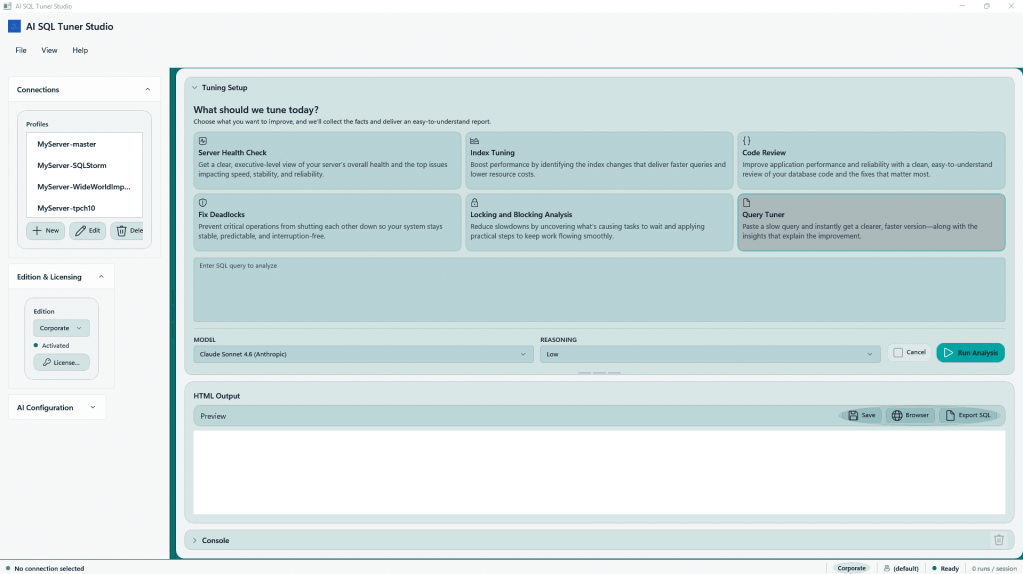
- Connect securely. Point at your database with a least-privileged SQL login (3-step setup guide). Windows, SQL or Entra ID authentication. No agents to install, no log shipping.
- Pick a goal. Choose one of the six tuning goals — from a single slow query to a full server health check — and run it.
- Get prioritized fixes. You receive an HTML report with execution-plan analysis, ready-to-run DDL, and query rewrites, ordered by impact.
Don’t take my word for it — you can browse real sample reports generated by the tool before you download anything.
See a Real Analysis
Rather than quoting hand-picked benchmark numbers, I’d suggest two things: look at the sample reports to see exactly what the output looks like, and then run the tool against your own workload. The Free Edition works with SQL Server Developer Edition and requires no credit card, so you can validate the recommendations against your own execution plans, which is the only benchmark that actually matters for your environment.
Frequently Asked Questions
Does EverSQL work with SQL Server?
EverSQL’s product is positioned as a PostgreSQL and MySQL optimizer, and since its 2023 acquisition by Aiven its engine has been integrated into the Aiven platform for those engines. It is not built as a SQL Server specialist. AI SQL Tuner Studio, by contrast, supports only the Microsoft stack: SQL Server, Azure SQL Database, Azure SQL Managed Instance, and Fabric SQL Database.
Does AI SQL Tuner Studio replace Azure SQL Automatic Tuning?
No — they complement each other. Azure’s automatic tuning handles index create/drop and plan-forcing scenarios in Azure SQL Database. AI SQL Tuner Studio goes deeper on individual queries: rewrites with before/after examples, operator-level plan analysis, parameter-sniffing strategies, plus code review, deadlock, and blocking analysis that automatic tuning doesn’t attempt.
Are the recommendations safe to apply?
Every recommendation is delivered as a reviewable report — DDL scripts and rewrites you inspect and deploy yourself. The tool never changes your database on its own, and it connects through a least-privileged login, so it couldn’t even if it wanted to.
Is my data sent anywhere?
The app runs on your Windows workstation and connects directly to your database. Only targeted metadata and execution-plan content are sent to the AI model, which is hosted on Azure via Microsoft Foundry — traffic stays inside the Azure trust boundary. Prefer your own deployment? Bring your own Azure OpenAI endpoint.
What does it cost?
Four editions: Free ($0, for SQL Server Developer Edition, no credit card), Standard ($125/yr), Pro ($250/yr), and Corporate ($600/yr with unlimited connections and Claude Opus models). Paid editions include a 14-day trial. See the full edition comparison.
Which AI models are used?
GPT-5.4 and Claude Sonnet 4.6 on every edition; Claude Opus 4.6, 4.7, and 4.8 on Corporate. You can switch models per analysis.
Try It on Your Own Workload
The fastest way to compare any two tuning tools is to point them at your actual slow queries. Download the Free Edition — no credit card required — or start a 14-day trial of a paid edition and run your worst query through the Query Tuner. You’ll have a prioritized report before your coffee gets cold.