

Ask ten DBAs what a “health check” means and you’ll get ten different lists. One person’s looking at wait stats and memory grants. The next is worried about tempdb file counts. Someone else just wants to know if their backup strategy is correct. The truth is they’re all right.
Release 2.2 is the version where AI SQL Tuner’s Server Health Check goal becomes even more exhaustive. Across the updates since 2.0.1, we’ve kept widening what a single run looks at so that one report gives you the full picture instead of a slice of it. Let me show you what that looks like now.
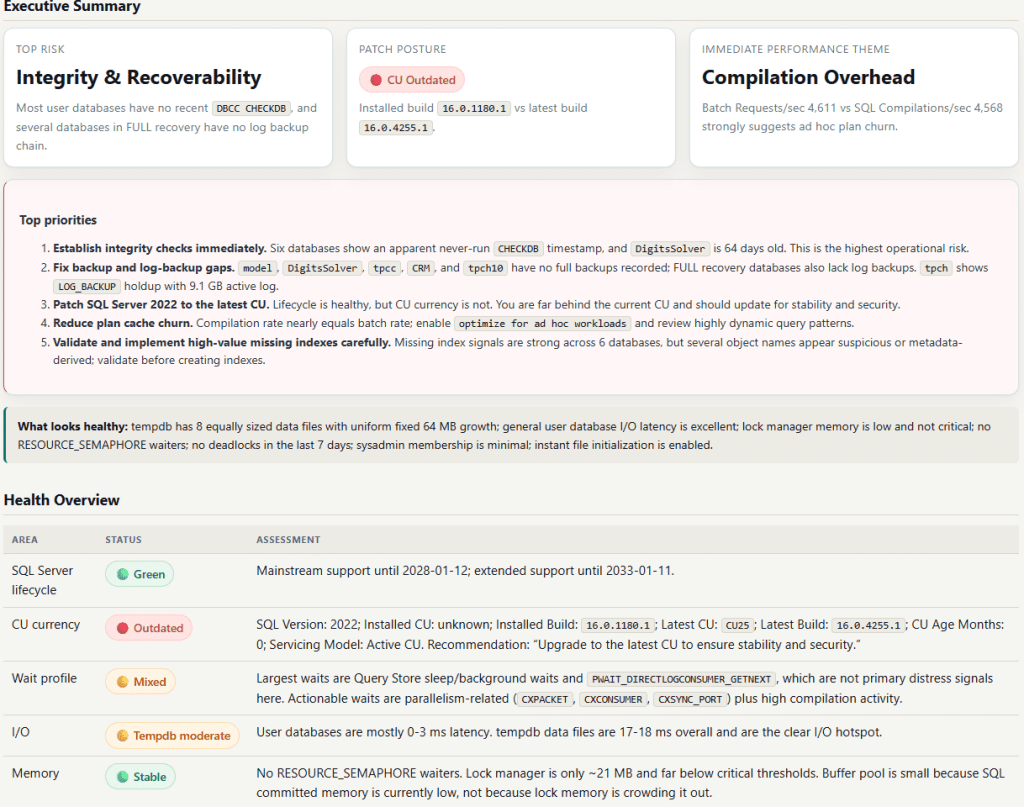
See it in action: Sample Server Health report
Server Health now looks where the quiet problems hide
The biggest expansion is in the configuration and storage layer—the stuff that doesn’t throw an error, it just slowly costs you performance and recoverability. A health run now includes five collectors aimed right at it:
- TempDB configuration. Reports file count, per-file size, autogrowth, and max-size against your logical CPU count, and flags uneven data files or mismatched autogrowth that quietly defeat round-robin proportional fill. The AI applies the Microsoft’s guidance, such as one data file per CPU up to eight, equally sized when it makes recommendations.
- Database file autogrowth risks. Surfaces files set to percent-based growth, fixed increments under 64 MB, disabled autogrowth, or files creeping within 10% of their max-size cap, each with a plain-language reason it’s a risk.
- Database options audit. Checks
AUTO_CLOSE,AUTO_SHRINK,PAGE_VERIFY, auto create/update statistics, RCSI, and snapshot isolation per database, so the classic foot-guns—auto-shrink churn, page verify that isn’t CHECKSUM, statistics turned off—get flagged. - Transaction log health. Reads VLF counts from
sys.dm_db_log_statsand flags logs bloated with too many VLFs, which drag down recovery, restores, and log operations. On older builds it degrades gracefully with an advisory instead of failing. - Instant file initialization. Tells you whether the SQL Server service account has Perform Volume Maintenance Tasks enabled, and recommends turning it on for faster file growth and restores.
None of these are exotic, but alongside the memory and lock diagnostics already in the goal (memory clerk breakdown, lock manager cache size, RESOURCE_SEMAPHORE waiters, top memory grants, buffer pool distribution), the Server Health Check run now reaches across memory, locking, storage, and configuration in one pass. That breadth is the point. Instead of running multiple scripts and potentially missing something important, you get comprehensive findings in minutes.
Patch check respects Microsoft’s release cadence
The patch check now compares the CU you’ve installed against the latest CU actually published for your SQL Server version, and reports a status you can act on: Current, Slightly Behind (one CU back), Outdated (two or more behind), or Current (No recent CUs published).
That last one is the fix. Take SQL Server 2019, whose final cumulative update, CU32, shipped in February 2025. A fully patched 2019 box now comes back green with “no recent CUs published” instead of getting flagged as outdated for running a CU that’s old through no fault of yours. Older versions like 2017, 2016, and 2014 are recognized as GDR-only, so the recommendation points you to the latest GDR security update rather than a CU that’s never coming. And it all stays maintainable through a single documented lookup table that’s still refined from Microsoft Learn at runtime when that data’s reachable.
Note: Lifecycle and CU-currency checks stay on-premises only. Azure SQL Database, Managed Instance, and Fabric handle their own patching, so we skip them those checks.
Index Tuning gets two new checks
Server Health wasn’t the only goal that got deeper. Index Tuning alos picked up two more collectors.
First, duplicate and overlapping index detection. It finds exact key duplicates and left-prefix overlaps within a table and reports the key and included columns for both, plus the reads, writes, and size of the narrower index—so “consolidate these” comes with evidence, not a hunch. It also identifies unique and constraint-backing indexes so nothing gets dropped blindly.
Second, untrusted or disabled constraint detection. Untrusted foreign keys and check constraints are easy to miss and quietly expensive—they block the optimizer from join elimination and predicate pruning. The tool now lists them and points you toward re-validating with ALTER TABLE ... WITH CHECK CHECK CONSTRAINT, while noting the validation cost on large tables.

See a complete sample index tuning report.
Enhanced schema and table scoping for index tuning and code review
If you’re tuning one schema or chasing one hot table, you don’t want a report on the entire database. So we spent several releases making the schema and table filters mean what you’d expect.
When you specify a schema and/or table, Index Tuning now scopes the object-level work to it: missing indexes, index usage stats, table sizes, foreign keys, column cardinality, and statistics all narrow to what you asked for. The new duplicate-index and constraint collectors honor that scope too. Database-wide context—plan cache, automatic tuning, database statistics—stays unfiltered on purpose, because that context is genuinely database-level.
We also fixed the trickiest part: the Query Store sections. Those used to filter on sys.query_store_query.object_id, which can point at a procedure or trigger rather than the table you care about. They now filter on the objects actually referenced in the Query Store plan XML, so table scope behaves correctly—and we added a top-N prefilter so that XML parsing stays fast on busy databases with deep Query Store history.
Code Review got the same treatment. When you scope a review to a schema, the supporting context sections, such as “Top 100 Tables by Row Count” and the largest index-usage summary, now show only that schema instead of the whole database, so the context around your code objects is actually relevant to them.
Conclusion
This latest release is all about making AI SQL Tuner Studio even more useful: the CU check respects Microsoft’s actual cadence and avoids false alarms, Server Health and Index Tuning collect a meaningful new set of configuration and index problems, and the schema/table filters now genuinely focus the analysis where you point them. It all still runs entirely on your machine, with no business data leaving the box.
To start using AI SQL Tuner Studio 2.2, pick the edition that is right for you or click Check for Updates inside Studio. And if you want to see the output before you install, take a look at the sample reports such as Server Health Report and Index Tuning Report.