
By Kevin A. Feit
Updated October 2026
Pricing update, October 2026: The editions and annual prices in this post are from the original launch. AI SQL Tuner Studio is now offered as Free, Pro ($19.99/month), Team ($39.99/month) and Enterprise ($79.99/month). See current editions and pricing.
AI SQL Tuner Studio, the next evolution of AI‑assisted performance tuning, is officially live.
Built as a modern Windows desktop application with a clean WinUI 3 interface, AI SQL Tuner Studio brings together deep SQL Server expertise, intelligent analysis, and a frictionless user experience — all designed to help DBAs and developers solve performance problems in minutes instead of hours.
SQL Server professionals can run all four core tuning goals — Server Health Check, Index Tuning, Code Review, and Deadlock Analysis — directly from a fast, native desktop experience.
Whether you’re a DBA, developer, consultant, or architect, AI SQL Tuner Studio gives you the clarity, confidence, and actionable insights you need to keep your SQL Server running at peak performance.
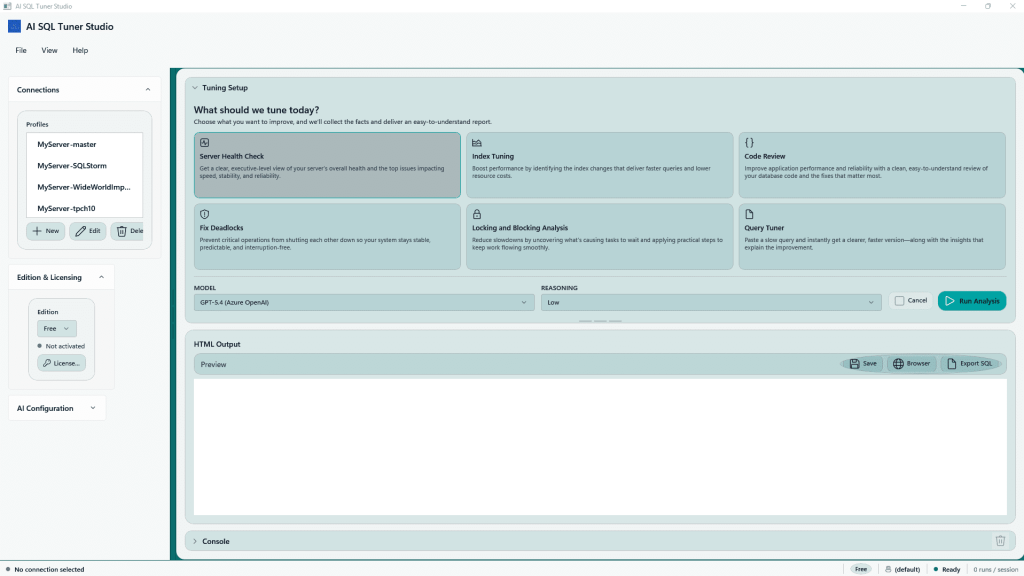
Table of Contents
Why We Built AI SQL Tuner Studio
If your database is not performing the way you want it is because of one of these reasons:
- Hardware: Your CPU is too slow, not enough cores, slow disk, or not enough memory
- SQL Server configuration settings: parallelism settings, max memory, query store
- Indexes: Missing indexes, too many indexes, wrong types of indexes
- Code: Inefficient code, joining on wrong columns, using cursors
- Database design: Overly complex SQL due to database design, wrong data types
- Transaction management and locking: Transactions that are too long, incorrect locking strategy that results in blocking or deadlocks
Determining the root cause is not easy. AI SQL Tuner Studio was created to cut through the noise.
Instead of digging through DMV queries, execution plans, and guesswork, you get clear, prioritized, evidence‑based recommendations powered by the AI SQL Tuner engine — now wrapped in a fast, intuitive desktop experience.
Six Tuning Goals. One Unified Experience.
AI SQL Tuner Studio is built around six high‑impact tuning goals — each designed to solve a specific class of SQL Server performance problems with precision and speed.

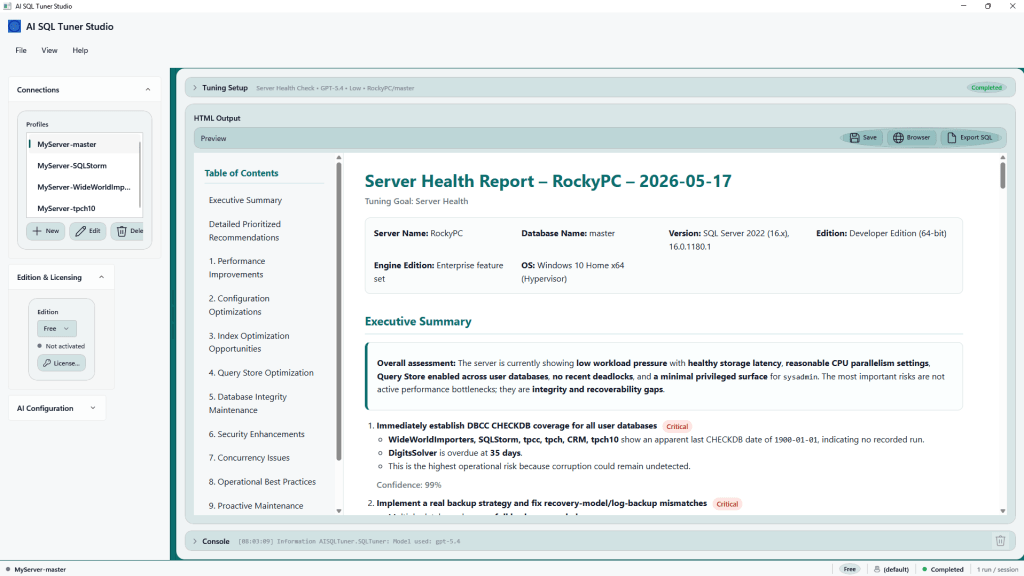
1. Server Health Check
Get a complete diagnostic snapshot of your SQL Server environment in minutes.
The Server Health Check analyzes:
- CPU, memory, and IO pressure
- TempDB configuration and contention
- Storage latency and throughput
- Max memory, MAXDOP, cost threshold, and other key settings
- Wait statistics and bottleneck patterns
- Database configuration issues
You receive a clean, prioritized report with clear explanations and recommended fixes — perfect for ongoing maintenance or onboarding new servers.
2. Index Tuning
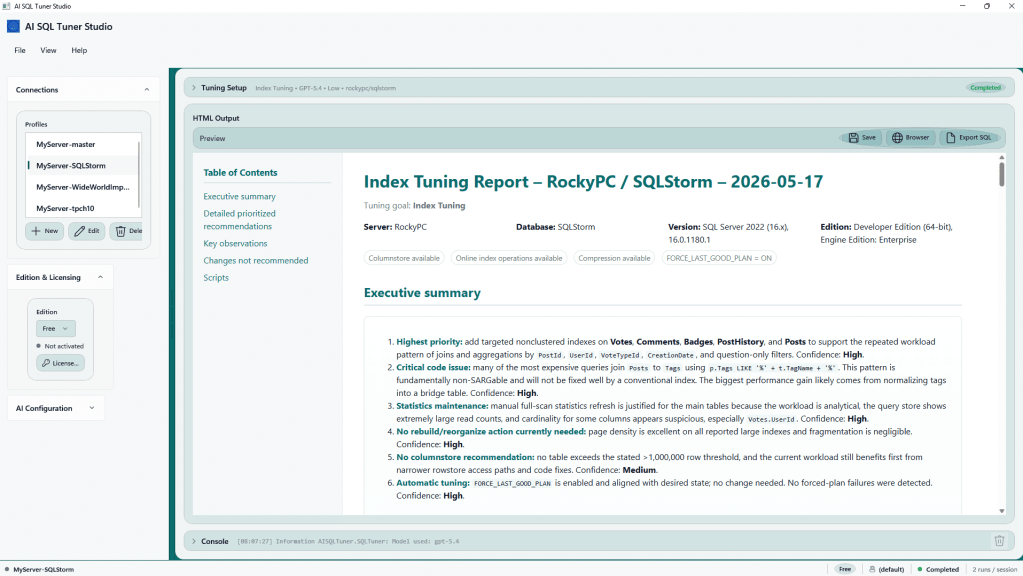
Index tuning is one of the fastest ways to improve SQL Server performance — and AI SQL Tuner Studio makes it effortless.
The Index Tuning Goal identifies:
- Missing indexes
- Duplicate or overlapping indexes
- Unused or low‑value indexes
- High‑impact improvements
- Estimated performance gains
You get ready‑to‑run T‑SQL scripts and a clear explanation of why each recommendation matters.
3. Code Review
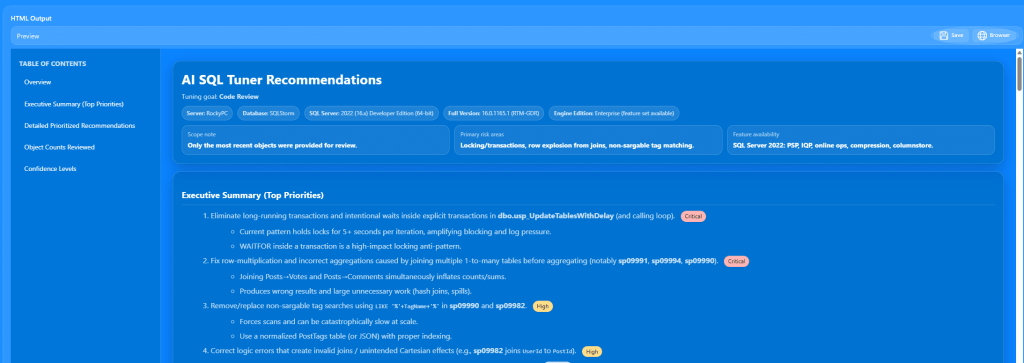
Bad query patterns are one of the most common causes of slow performance.
The Code Review Goal analyzes your SQL and flags:
- Implicit conversions
- Parameter sniffing risks
- Non‑SARGable predicates
- Inefficient joins and subqueries
- Over‑use of scalar functions
- Missing filters and unnecessary scans
- Poor cardinality estimates
You get a detailed, developer‑friendly explanation of each issue — plus guidance on how to fix it.
4. Deadlock Analysis
Deadlocks are painful, unpredictable, and often hard to diagnose.
The Deadlock Analysis Goal makes them easy to understand.
AI SQL Tuner Studio will:
- Analyze the XML from the deadlock event
- Identify the blocking and victim processes
- Explain the root cause in plain English
- Recommend schema, index, or code changes
- Suggest safer transaction patterns
You get a clear path to eliminating recurring deadlocks.

A Modern, Native Windows Experience
AI SQL Tuner Studio is built with WinUI 3 for a clean, responsive, and distraction‑free workflow:
- Fast local execution
- No browser tabs
- No clutter
- Smooth navigation between tuning goals
It feels like a professional tool built for serious SQL Server work — because it is.
Professional HTML Reports You Can Share
Every tuning goal generates a polished HTML report you can:
- Attach to tickets
- Share with your team
- Include in consulting deliverables
- Use for documentation and audits
Each report includes explanations, evidence, and ready‑to‑run scripts.
Designed for Real SQL Server Workloads
AI SQL Tuner Studio supports:
- SQL Server 2016–2022
- On‑prem, VM, and cloud deployments
- Azure SQL Managed Instance
- Azure SQL Database and Fabric SQL Database
- Use our AI endpoint or bring your own
It’s built for the environments DBAs and developers actually manage.
Flexible Licensing for Every Team Size and SQL Estate
AI SQL Tuner Studio is available in four editions designed to match your environment, workload, and budget — from individual developers to large enterprises managing mission‑critical SQL Server fleets.
Free Edition — $0/year
Perfect for students, developers, and anyone evaluating the platform.
- Supports SQL Server Developer Edition
- Unlimited servers
- All four tuning goals included
Standard Edition — $125/year
Ideal for small teams and light production workloads.
- Supports SQL Server Standard Edition, Azure SQL Database, Fabric SQL Database, and Managed Instance (General Purpose)
- Up to 2 servers
- All tuning goals included
- 14‑day free trial
Pro Edition — $250/year
Built for professionals managing high‑value or mission‑critical workloads.
- Supports all SQL Server editions, including Enterprise Edition and Managed Instance Business Critical
- Up to 2 servers
- All tuning goals included
- 14‑day free trial
Corporate Edition — $600/year
Designed for enterprises, ISVs, and large SQL estates.
- Supports all SQL Server editions
- Unlimited servers
- All tuning goals included
- Ideal for consulting teams and organizations with many instances
- 14‑day free trial
Each edition includes Server Health Check, Index Tuning, Code Review, Deadlock Analysis, and full local execution with no cloud storage required.
Start Tuning Smarter Today
AI SQL Tuner Studio is available now.
Run your first Server Health Check, tune your indexes, review your SQL code, or analyze a deadlock — all from one unified desktop app.
Visit the AI SQL Tuner Studio Products page to download and get started.
Leave a Reply