
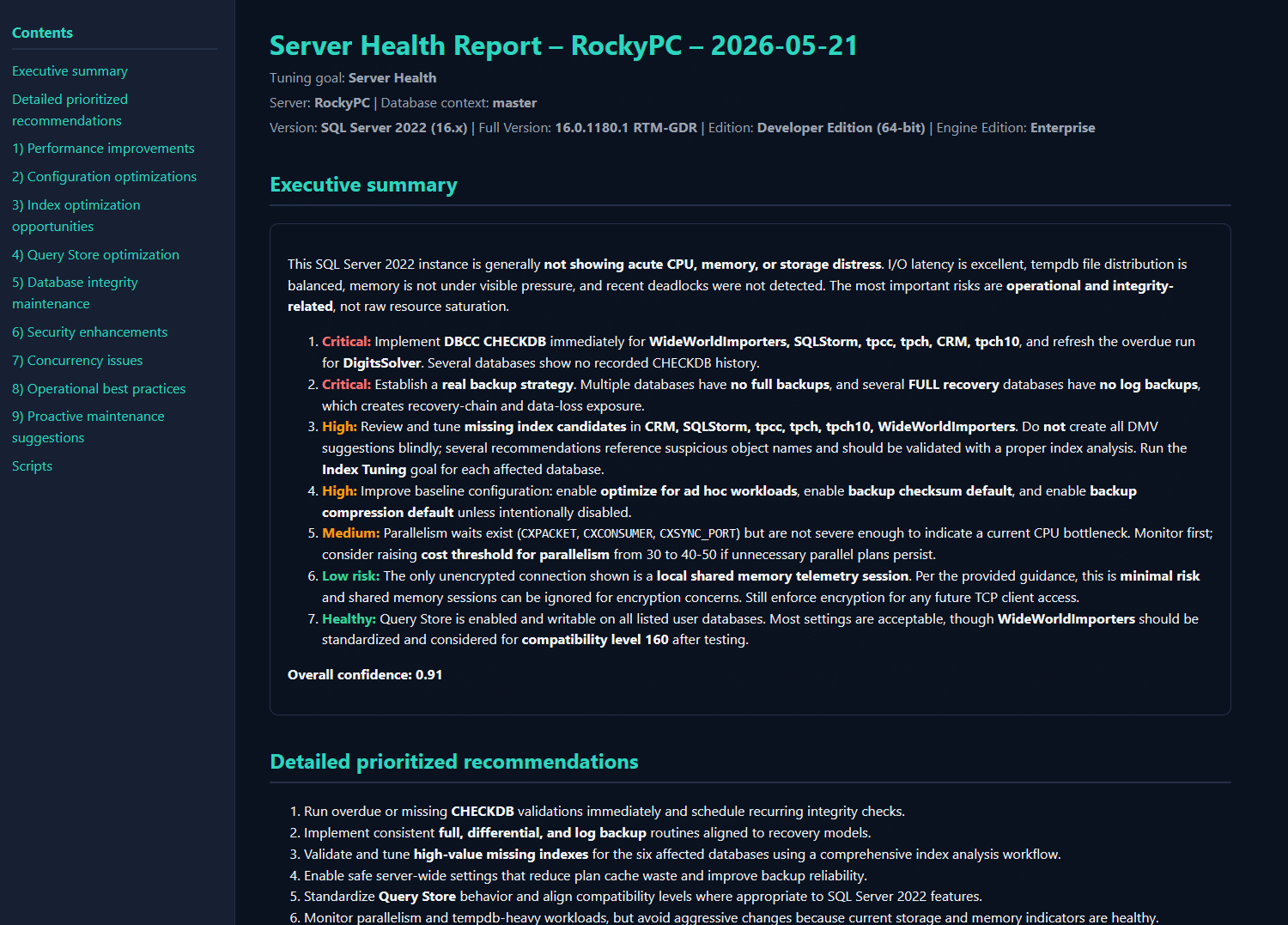
AI SQL Tuner Studio Release 1.0.48 is out with several updates. The headline changes are a much smarter way of measuring index page density on large databases, dark mode for the HTML reports, and a streaming report pane that fills in as the model writes instead of leaving you waiting. Here’s what changed and why it matters.
Table of Contents
Index page density detection that won’t scan your whole database
AI SQL Tuner Studio uses sys.dm_db_index_physical_stats to get avg_page_space_used_in_percent. This is passed to the AI to identify low page density. These can hurt performance since they require extra logical reads when you use the index.
The problem was how we used to collect it.
Calling sys.dm_db_index_physical_stats with NULL for the object ID tells SQL Server to get stats for every object in the database. On a small dev database, fine. On a multi-terabyte production instance, that caused timeouts.
So we changed the approach. The collector now builds a bounded candidate list first — your missing-index candidates plus your largest tables — and then calls the function once per object in a loop. When you scope analysis to a single schema and table, it resolves the object_id up front and passes it straight in, so the scan touches exactly one object and nothing else. We also raised the page-count threshold for the broader scans from 128 to 1,000 pages, which strips out the noise from tiny indexes where fragmentation doesn’t really cost you anything.
On busy databases with a lot of DDL churn — think temp tables and short-lived objects — an object could vanish between the moment we snapshot the candidate list and the moment we actually scan it. That produced SQL error 2573, “Could not find table or object ID.” The collector now re-checks sys.objects and skips anything that’s already gone, so the scan keeps running cleanly instead of erroring out mid-analysis.
Net effect: index tuning runs faster on large instances, doesn’t fall over when objects come and go underneath it, and still surfaces the worst-density indexes first.
Dark mode for HTML reports
If you live in a dark IDE and a dark terminal, the bright white report was a jarring exit. Not anymore.
Generated reports now include a dark palette. The AI prompt now instructs the model to include a @media (prefers-color-scheme: dark) block in the report CSS, and the static fallback reports — including the “no deadlocks found” page — carry their own dark styles too, so you get a consistent look whether the model wrote the page or we did. The embedded WebView2 viewer inside the app also syncs to your in-app Light/Dark setting rather than following the OS, so the report matches the rest of the UI.
The scheme itself is graphite surfaces with mint-teal accents in dark mode, and paper-white with teal in light mode. Open a report in your browser and it’ll respect your system preference automatically.

Reports that stream as they’re written
Long analyses used to mean 2+ minutes of blank screen while the model thought. We rebuilt that.
The report pane now fills progressively as tokens arrive. The empty state crossfades into the report over about 300 milliseconds instead of snapping.
- Your scroll position holds. Earlier, every progressive refresh yanked you back to the top — annoying when you’re trying to read section two while section five is still being written. We now capture the scroll offset before each reload and restore it the instant the updated document lands, so you can read the finished parts while new content keeps arriving at the bottom.
- No more blank reports. We moved progressive rendering to accumulated HTML snapshots via
NavigateToString, which killed the blank-report regressions that the older iframe-sandbox approach kept producing.
Note: Streaming only applies to OpenAI model. Anthropic Claude models still appear in one shot when processing finishes.
We also added streaming timing diagnostics to the console — when the shell finished loading, when the first token landed, when the last one arrived — which makes it easy to tell model latency apart from UI rendering time when something feels slow.
See exactly what runs before anything leaves your machine
This one matters if you work anywhere with a change-control process or a security team that asks questions.
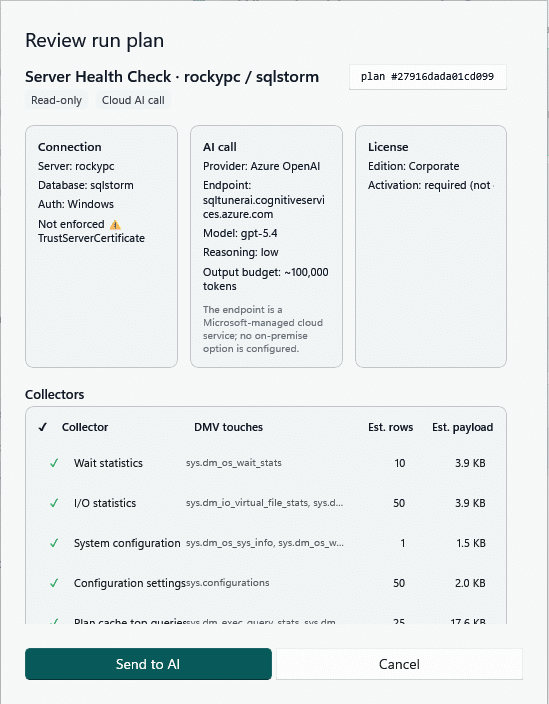
We added a Review run plan dialog that appears when you click Run Analysis. Before a single byte goes to the AI endpoint, you can see the connection details, the AI endpoint and model, your license posture, and a full table of the collectors that will run — including the SQL each one issues and the estimated payload size. Plans export to JSON named {server}-{goal}-{utc}.runplan.json, which drops neatly into a change ticket or a procurement review. You can suppress the dialog, and the suppression resets automatically whenever the goal, model, reasoning level, server, or database changes.
The collector table reflects every section that actually executes at run time. Query Tuner, for example, surfaces the seven descriptors it really runs (plan XML, index usage, missing indexes, table sizes, foreign keys, column cardinality, statistics settings).
Onboarding tour and empty state
A couple of smaller fixes:
- First launch now offers a four-step guided tour (re-launchable from Help → Take a Tour)
- The report pane shows a proper illustrated empty state instead of a blank rectangle until your first run completes.
Updating
AI SQL Tuner runs entirely on your machine — no telemetry, no background services, no business data sent anywhere (only SQL Server system catalog data leaves the box, and only after you approve the run plan). Grab 1.0.48 from aisqltuner.com, or use Check for Updates inside Studio. If you’re coming from 1.0.40 or earlier, the index page density and streaming changes alone are worth the upgrade.
Leave a Reply